
🔥 Hot


Yandex Go: Taxi Food Delivery
Yandex Go
Car and scooter rides, delivery of items and restaurant food.
• RIDES
Pick your service class
Ride Economy for everyday errands. Comfort and Comfort+ to relax with more legroom. Minivan for big groups, traveling with skis or bicycles, or trips to the airport. Carpool for discount rides with other users, and City to City for convenient rides between cities.
• CITY TO CITY
When you need a ride to a different city, choose City to City. No extra stops or transfers, and the comfort you're used to in a car is now way more affordable. Schedule your ride in advance and save even more.
• CARS WITH CHILD SAFETY SEATS
Select the With Kids section and request a ride with one or two child safety seats for different ages. Drivers in these service classes have passed an additional exam on traveling with children.
• YANDEX GO ULTIMA
For rides to business centers or meetings, choose the Business service class. Premier and Elite classes have flagship cars with the highest rated drivers, and Cruise offers business class cars for large groups.
Each driver is interviewed in person and tested on service requirements. Drivers are ready to open the door for you and listen to all your suggestions about the route, music, and car temperature.
• DELIVERY
Have a courier pick up your printer after repairs, hand over documents to a contractor, or haul off that old couch you sold. For large items, you can order a cargo truck. Couriers will arrive for pickup in just 15 minutes.
• SCOOTERS
Bright yellow Yandex Go scooters are already cruising around Moscow, Zelenograd, St. Petersburg, Krasnodar, Nizhny Novgorod, Yekaterinburg, Tula, Kaluga, Adler, and other cities. Rent up to three scooters from the same account, buy Minute Bundles to make rides more affordable, and use Yandex Plus to subscribe to Scooters for free unlocks.
• MARKET
Yandex Market has dozens of categories and millions of products for everyone. Search for items or select a category to find what you need. Add products to your cart, place an order, and track its status all in the Yandex Go app.
If you already added items to your cart in the Yandex Market app, you'll see your order in Yandex Go and can continue checkout. If items are out of stock, we'll offer similar products at approximately the same price.
Track your order status in the app.
• CARSHARING
Our fleet tops 16,000 vehicles with more than 18 models. Drive anywhere in or outside the city, or transport large items with Drive.
• MY CAR
Find gas stations, car washes, and charging stations for your car directly in the app.
• FOOD FROM RESTAURANTS
Order delivery from independent and popular chain restaurants. Stock up on snacks for a party, soup, khachapuri, wok, sushi, pizza, and vegan options.
Delivery from signature restaurants is handled by Yandex Eats Ultima.
•TRAVEL
In some cities, the app already has Yandex Travel: everything you need to make your next trip easier and more fun. Book hotels and buy airline, train, and even city-to-city bus tickets.
• TRANSPORT
View schedules for buses, trams, commuter trains, and other public transport, compare routes, and find the nearest stops and convenient transfers. Available in some cities for now.
• PLUS POINTS
Earn cashback points for rides in Comfort, Comfort+, and Ultima service classes, as well as for orders in Lavka, Yandex Eats, and Yandex Market. Use Plus points to save in various Yandex services.
Availability of services and options may vary depending on the region.

AppLock - Lock apps & Pin lock
AppLock is a light app protector tool to protect your privacy in mobile apps.
☀️——Highlights of AppLock——☀️
🔒 AppLock can lock Social apps: Facebook, Whatsapp, Messenger, Instagram, Tumblr, WeChat and so on. No one can peep 👀 at your private chat any more;
🔒 AppLock can lock System apps: Gallery, SMS, Contacts, Gmail, Settings, incoming calls and any app you choose. Prevent unauthorized access and guard privacy;
🔒 AppLock has multiple lock options: PIN Lock、Pattern Lock. choose your favorite style to lock apps .
🔒 AppLock has photo vault. Keep safe gallery and hide your photos, videos without worrying about others see
🔒 AppLock support screen lock. Prevent strangers from using your phone without your permission.
🔒 AppLock has rich themes:We have built-in sets of beautiful Pattern and PIN themes for your choice, will continue to update.
Tips:If you have a phone with a fingerprint reader that is either made by Samsung or is running Android Marshmallow, you can check the box in the App Lock settings labeled "Use fingerprint to unlock"
👮 Real-Time Protection
Monitor the new installation and app updating, real-time remind avoiding potential risks, keeping your devices safe.
🚀 Photo vault
Easily encrypt and hide photos & videos
👁 Intruder Selfie
Capture any intruder of your phone. Snaps photos of intruders who enters the wrong lockscreen.
📪 Message Security
Hiding notifications preview timely to protect your privacy. It gathers all chat notifications into one and makes them easier to read & manage.
ℹ️ Notification Cleaner
One-click cleaning of spam push notifications, No annoying notifications anymore.
🛡️ Safe Lockscreen
AppLock secure your phone from intruders with PIN and pattern lock security.
🌈 Live Theme
Live Theme features to make unlocking apps even more fun! We will regularly launch the new Live Themes.
Privacy Browser
The incognito mode and block trackers can ensure you private browsing.
——More Features——
* Lock application to prevent others are free to buy, uninstall applications!
* Lock setting to prevent misuse of the phone to change the system settings!
* Pattern Lock: simple and fresh interface, unlock faster!
* PIN lock: random keyboard. Much safer for you to lock apps
* Unlock with Fingerprint: Operation is more convenient and faster(The premise is that your phone hardware supports fingerprint unlocking)
* Lock screen timeout
* Lock 3G, 4G data, Wi-Fi, Bluetooth and more
* Lock new apps
* Uninstallation Prevention
* Set Lock Time to only activate lock at certain time
* Easy-to-use and user friendly GUI
——How it Works——
■ Download and install the Transparent Pattern Lock.
■ Go in setting and enable the lock.
■ Set your pattern.
■ To unlock draw your pattern and you open the lock and see you home screen.
——FAQ——
1. How to set my password at the first time?
🔔 Open AppLock -> Draw a pattern -> Confirm pattern;(or Open AppLock -> Enter PIN code -> Confirm PIN code)
Note: For android 5.0+, allow Applock to use usage access permission -> Find AppLock -> Allow usage access
2. How to change my password?
🔔 Open AppLock -> Settings -> Reset password -> Enter new password -> Reenter password
3. What should I do if I forget the AppLock Lite password?
🔔 Click “Forget Password” -> Enter Luck Number -> Enter new password -> Reenter password
Contact US: [email protected]

Ola: Book Cab, Auto, Bike Taxi
Upgrade your life the OLA Way!
Ever found yourself chasing Cabs, Auto Rickshaws or Bike Taxis? Craving your favorite food, or searching for a reliable parcel service? Welcome to your one-stop destination - the Ola App! With over 40 Million Trusted users across 200+ cities in India, OLA has become the Choice of the Nation.
🚗 Want to learn about our Services in OLA App?
Let’s start with the A, B & C of Rides:
🛺 A for Auto Rickshaw: Want Auto rides without the Fare drama ?
No more “meter nahi chal raha” excuses. Hop in for quick and affordable city trips with Transparent fares where your pocket will thank you.
Tuk Tuk Tuk Tuk 🛺 …… your OLA Auto is waiting for you.
🛵 B for Bike Taxi: Need to be as quick as a bullet?
Say hello to your little friend, Ola Bike Taxi! Slip through traffic jams like a pro ninja. Perfect for solo riders with places to be.
Why wait? Zip, zap, zoom!
🚗 C for Cab: Because You Deserve Options
Whatever your need, we’ve got an OLA cab for that:
🚗 OLA Mini: Quick, comfy & wallet-friendly.
🚘 OLA Prime Sedan: Spacious sedans, perfect for longer rides where you can Netflix & Ride in comfort.
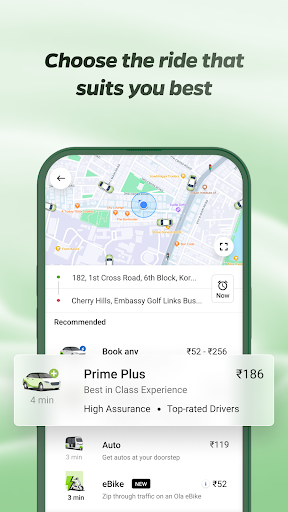
🚙 OLA Prime Plus: A touch of luxury & Guaranteed no cancellations. Just you and your premium quality ride with Top notch drivers.
🚐 OLA Prime SUV: Traveling squad-style for a trip? Get Spacious SUVs with ample room for your Family or Friends and their luggage.
OLA Rental Cars:
Need a flexible ride for a few hours? 🕒 Renting a car with Ola gives you the freedom to hire a car on your terms. Whether it’s for running errands, meeting friends or family, or cruising the city, you can make as many stops as you want 🚗.
OLA Outstation Cabs:
Planning a long intercity ride? Pack your bags for a dream vacation or a hometown visit! 🌆 Sit back, vibe to your playlist 🎶 and let us handle the wheel 🛣️🚖.
But why Ride Ola?
🔒 Verified OTP:Travel OLA-round only after confirming with a secure OTP.
🧳 Luggage-Friendly: Plenty of space for all your essentials.
🕒 Schedule Rides: Plan your travel with ease & never miss your ride.
📞 SOS Feature: Prioritizing your safety every step of the way.
🚨 Emergency Contacts: Keep your loved ones in the loop.
Oh wait! It does not end here. We are more than just rides now.
🍔 Food Delivery:
Knock Knock, your meal is here! Ola Foods now delivers love on plate.
🍉 Choose from endless Desi & International cuisines to mouthwatering snacks or desserts. After all, a happy tummy = happy ❤️!
😋 Over 9000+ restaurants with a range of top choices & Nearby spots, including Domino’s, Pizza Hut, McDonald’s, Starbucks, Subway, Burger King, KFC & more.
💸 Order meals at pocket-friendly prices! With discounts up to 50%, make your expenses lighter & your tummy heavier.
🥗 Switch to our New Veg mod for Vegetarian lovers.
So what are you waiting for? Your Food’s just a tap away.
📦 Parcel Delivery:
Got something to send? Or waiting for that "urgent" delivery?🏃♀️ Zip packages across the city via OLA Parcel.
Send Packages: 📤Pack it & Send it. Enter the pickup & drop-off locations, we’ll handle the rest! 🚚
Receive Packages: 📥 Track it & Receive it. Keep an eye on the live tracking & get your package delivered right to you! 📦✨
Booking a Cab, Ordering Food, or Sending & Receiving a Parcel? OLA super easy all-in-one app will guide you every step of the way.
✅ Pick Your Location Easily. Yes, even that chai stall near the signal! 📍
✅ Pay Your Way – Cash, UPI, Cards and more!
✅ Track your ride in Real-Time 🚀
Special Offer
It’s raining GOLD here! 🌟 Earn & redeem OLA Coins for epic discounts on every rides, meals & courier services and save more 💰.
Just open the app and see how effortless it is! 😉 Download, tap and get the OLA-timate Experience! ✨

Facebook
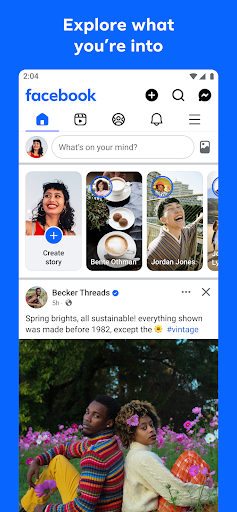
Where real people propel your curiosity. Whether you’re thrifting gear, showing reels to that group who gets it, or sharing laughs over fun images reimagined by AI, Facebook helps you make things happen like no other social network.
Explore and expand your interests:
* Shop Marketplace for hidden gems and take your hobbies to the next level
* Personalize your Feed to see more of what you like, less of what you don’t
* Ask Meta AI for information and get answers instantly
* Drive into reels that reflect the things you're interested in
* Search Facebook on any topic and get more interactive results
Connect with people and communities:
* Join groups to learn tips from real people who’ve been there, done that
* Get inspired by creators, or catch up with Friends
* Add new Friends to your world, but also decide how closely to keep up with them
* Privately message relatable posts that only your BFF will get or that reels trend everyone’s talking about
* Catch up with your friends through video and voice calls
Share your world:
* Use generative AI to create custom stickers and images to delight friends
* Customize your profile to choose how you show up and who sees your posts
* Effortlessly create reels from trending templates, or showcase your creativity with a full suite of editing tools
* Capture moments on the fly with stories
Some features may not be available in your country or region.
Terms & Policies: https://www.facebook.com/policies_center
Privacy Policy: https://www.facebook.com/privacy
Learn how we're working to help keep our communities safe across Meta technologies at the Meta Safety Center: https://about.meta.com/actions/safety


Instagram
Little moments lead to big friendships. Share yours on Instagram.
—From Meta
Connect with friends, find other fans, and see what people around you are up to and into. Explore your interests and post what's going on, from your daily moments to life's highlights.
Share what you’re up to and into on Insta®.
- Keep up with friends on the fly with Stories and Notes that disappear after 24 hours.
- Start group chats and share unfiltered moments with your Close Friends.
- Share memories from recent events or trips in Feed.
- Turn your life into a movie and discover short, entertaining videos on Instagram with Reels.
- Customize your posts with exclusive templates, music, stickers and filters.
Dive into your interests.
- Watch videos from your favorite Creators and discover new content that’s personalized to your interests.
- Get inspired by photos and videos from new accounts in Explore.
- Discover brands and small businesses, and shop products that are relevant to your personal style.
Some Instagram features may not be available in your country or region.
Terms and Policies - https://help.instagram.com/581066165581870
Consumer Health Privacy Policy: https://privacycenter.instagram.com/policies/health
Learn how we're working to help keep our communities safe across Meta technologies at the Instagram Safety Center: https://about.instagram.com/safety
✍️ Good reviews

Check Thailand Lottery
Check Thai Government Lottery.
* Announcement of prizes quickly and instantly.
* Notification when the lottery draw starts.
* Notification when all prizes are drawn.
* Check the lottery by entering 6 digits and the app will tell you if you won or not.
* Can check both the latest period and the last 2 years.
* Shows the complete lottery winning prize, such as in the case of winning both the first and last number of prizes.
* Keep history for viewing What lottery numbers have you ever checked?
* Watch live broadcasts/recordings of the drawing.
* This app is not affiliated with any agency of the Thai government. It only facilitates lottery buyers to be able to easily check their prizes. which information about the prize draw in this app Reference is from the official website of the Thai Government Lottery Office. https://www.glo.or.th/
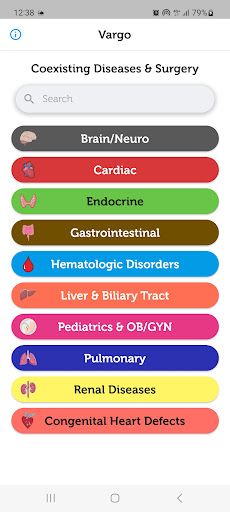

Coexisting Diseases & Surgery
A comprehensive medical disease app that contains the following:
1) Gives the description, etiology, onset, diagnosis, pathophysiology, treatment, and prognosis of common and rare diseases.
2) Provides specific information how to manage the surgical patient’s coexisting disease(s) perioperatively, and what the disease related concerns are.
One-time purchase with free updates.
This app is equivalent to a 4,000 page book and will always be expanded with frequent updates.
Categories:
Brain/Neuro
Cardiac
Hematologic Disorders
GI System
Endocrine System
Liver and Biliary Tract
Pediatrics
Renal Disease
Pulmonary
Congenital Heart Disease (coming soon)


Coscos
Coscos is a live social community with so many users around the world where you can connect with new friends, and watch talented creators
You can make real friends, chat with your favorite creators using our real-time chat, and join the new wave of social communication.


QuickBars for Home Assistant
Bring your smart home to the big screen. QuickBars for Home Assistant puts fast, beautiful controls on Android/Google TV so you can toggle lights, adjust climate, run scripts, and more—without leaving what you’re watching.
What it does
• Instant overlays (QuickBars): Launch an interactive sidebar over any app for tap-fast control of your favorite Home Assistant entities.
• Remote key actions: Map single, double, and long-press on your TV remote to open a QuickBar, toggle an entity, or launch another app.
• Camera PIP: Import your MJPEG streams and display them as PIP.
• Deep customization: Choose entities, icons, names, order, colors, and more to tailor the experience.
• TV-first UX: Built for Android/Google TV with smooth animations and a clean, couch-friendly layout.
• Launch a QuickBar or PIP from Home Assistant: Requires persistent background connection enabled, allows you to launch a camera PIP or a QuickBar based on an Home Assistant automation!
• Backup & Restore: Backup your Entities, QuickBars and Trigger keys manually and restore them, even to a different TV!
Private & secure
• Local connection: Connect directly to your Home Assistant using IP + a Long-Lived Access Token (optional remote access via HTTPS).
• Hardware-backed encryption: Your credentials are encrypted and stored locally; they never leave the device except to communicate with Home Assistant.
• Clear permission prompts for Accessibility (to capture remote button presses) and Display over other apps (to show overlays).
Easy setup
• Guided onboarding: Where to find your Home Assistant URL and how to create a token.
• QR Token Transfer: Scan a QR code and paste your token from your phone—no tedious typing on TV.
Entity management
• Import the entities you care about, rename them with friendly names, choose icons, customize single/long-press actions, and reorder freely.
• Automatically flags orphaned entities that were removed from Home Assistant.
Free vs Plus
• Free: 1 QuickBar & 1 Trigger Key. Full styling options. Full single/double/long-press support.
• Plus (one-time purchase): Unlimited QuickBars & Trigger Keys, plus advanced layouts:
• Position QuickBars at Top / Bottom / Left / Right of the screen
• For left/right positions, choose 1-column or 2-column grid
Requirements
• A running Home Assistant instance (local or reachable via HTTPS).
• Android/Google TV device.
• Permissions: Accessibility (for remote key capture) and Display over other apps.
Take control of your home from the couch. Download QuickBars for Home Assistant and make your TV the smartest remote you own.
QuickBars for Home Assistant is an independent project and is not affiliated with Home Assistant or the Open Home Foundation.


Digital Key Connect - Car Key
Tired of fumbling around for your keys? Want to get real-time updates on your car's status? Digital Key Connect - Car Key, the app that turns your smartphone into a smart and powerful car control center.
Experience Convenience and Control of your vehicle:
✅ Wirelessly LOCK & UNLOCK car doors on your phone: a simple tap on your smartphone screen. Whether you're rushing into the house and forgot to lock up, or want to grant a trusted friend temporary access, Digital Key Connect - Car Key provides instant and reliable door control. This is your ultimate digital car key solution.
✅ Real-time Tire Pressure, Access Monitoring on your phone: Digital Key Connect - Car Key app will car key connect seamlessly with your vehicle's sensors to display the current pressure of each tire directly on your smartphone.
✅ Comprehensive Vehicle Status Tracking on your phone, including tire pressure, oil / EV battery level, and receive safety alerts to avoid risks of road accidents or engine breakdown when driving. Stay informed about your car's condition before you even step inside, allowing you to plan your journeys with confidence and anticipate any potential maintenance needs.
✅ SMART MAP to remotely locate your car or find the fastest routes to car parks or gas / EV charging stations on maps.
✅ Integrated CarAI virtual assistant helps solve your problems
Benefits of Using Digital Key Connect - Car Key:
Enhanced Security:
Remotely lock your car doors for added peace of mind, no matter where you are.
IIncreased Convenience:
Unlock car effortlessly, especially useful when your hands are full or in inclement weather.
Proactive Vehicle Maintenance:
Stay informed about your tire pressure and other vital vehicle stats to prevent potential issues and ensure optimal performance.
Improved Fuel Efficiency:
Maintaining correct tire pressure, as monitored by the app, can contribute to better fuel economy.
Extended Tire Lifespan:
Timely alerts about low tire pressure can help you avoid premature tire wear.
Instant Access to Information:
The Car AI Assistant provides quick and easy answers to your car-related questions, eliminating the need for manual searches.
Greater Confidence on the Road:
Knowing your car's status in real-time empowers you to drive with more assurance.
Your Digital Car Key:
Replace your traditional key with the convenience of your smartphone.
Seamless Car Key Connect:
Establish a reliable and secure connection with your vehicle.
Digital Key Connect - Car Key app isn't just another remote control app; it's your personal Car AI Assistant, providing seamless access, vital vehicle information, and unparalleled convenience right at your fingertips. Imagine a world where you can effortlessly manage your car's essential functions and gain deeper insights into its status, all through the intuitive interface of your smartphone. That future is now, with Digital Key Connect - Car Key.
Thanks and Best Regards,
Terms of Use: https://cooldev.vn/p/1/privacy-policy
Privacy Policy: https://cooldev.vn/p/2/terms-of-service
Contact Us: [email protected]
🔥 Hot Comments
Yandex Go: Taxi Food Delivery
Yandex Go
Car and scooter rides, delivery of items and restaurant food.
• RIDES
Pick your service class
Ride Economy for everyday errands. Comfort and Comfort+ to relax with more legroom. Minivan for big groups, traveling with skis or bicycles, or trips to the airport. Carpool for discount rides with other users, and City to City for convenient rides between cities.
• CITY TO CITY
When you need a ride to a different city, choose City to City. No extra stops or transfers, and the comfort you're used to in a car is now way more affordable. Schedule your ride in advance and save even more.
• CARS WITH CHILD SAFETY SEATS
Select the With Kids section and request a ride with one or two child safety seats for different ages. Drivers in these service classes have passed an additional exam on traveling with children.
• YANDEX GO ULTIMA
For rides to business centers or meetings, choose the Business service class. Premier and Elite classes have flagship cars with the highest rated drivers, and Cruise offers business class cars for large groups.
Each driver is interviewed in person and tested on service requirements. Drivers are ready to open the door for you and listen to all your suggestions about the route, music, and car temperature.
• DELIVERY
Have a courier pick up your printer after repairs, hand over documents to a contractor, or haul off that old couch you sold. For large items, you can order a cargo truck. Couriers will arrive for pickup in just 15 minutes.
• SCOOTERS
Bright yellow Yandex Go scooters are already cruising around Moscow, Zelenograd, St. Petersburg, Krasnodar, Nizhny Novgorod, Yekaterinburg, Tula, Kaluga, Adler, and other cities. Rent up to three scooters from the same account, buy Minute Bundles to make rides more affordable, and use Yandex Plus to subscribe to Scooters for free unlocks.
• MARKET
Yandex Market has dozens of categories and millions of products for everyone. Search for items or select a category to find what you need. Add products to your cart, place an order, and track its status all in the Yandex Go app.
If you already added items to your cart in the Yandex Market app, you'll see your order in Yandex Go and can continue checkout. If items are out of stock, we'll offer similar products at approximately the same price.
Track your order status in the app.
• CARSHARING
Our fleet tops 16,000 vehicles with more than 18 models. Drive anywhere in or outside the city, or transport large items with Drive.
• MY CAR
Find gas stations, car washes, and charging stations for your car directly in the app.
• FOOD FROM RESTAURANTS
Order delivery from independent and popular chain restaurants. Stock up on snacks for a party, soup, khachapuri, wok, sushi, pizza, and vegan options.
Delivery from signature restaurants is handled by Yandex Eats Ultima.
•TRAVEL
In some cities, the app already has Yandex Travel: everything you need to make your next trip easier and more fun. Book hotels and buy airline, train, and even city-to-city bus tickets.
• TRANSPORT
View schedules for buses, trams, commuter trains, and other public transport, compare routes, and find the nearest stops and convenient transfers. Available in some cities for now.
• PLUS POINTS
Earn cashback points for rides in Comfort, Comfort+, and Ultima service classes, as well as for orders in Lavka, Yandex Eats, and Yandex Market. Use Plus points to save in various Yandex services.
Availability of services and options may vary depending on the region.
Ola: Book Cab, Auto, Bike Taxi
Upgrade your life the OLA Way!
Ever found yourself chasing Cabs, Auto Rickshaws or Bike Taxis? Craving your favorite food, or searching for a reliable parcel service? Welcome to your one-stop destination - the Ola App! With over 40 Million Trusted users across 200+ cities in India, OLA has become the Choice of the Nation.
🚗 Want to learn about our Services in OLA App?
Let’s start with the A, B & C of Rides:
🛺 A for Auto Rickshaw: Want Auto rides without the Fare drama ?
No more “meter nahi chal raha” excuses. Hop in for quick and affordable city trips with Transparent fares where your pocket will thank you.
Tuk Tuk Tuk Tuk 🛺 …… your OLA Auto is waiting for you.
🛵 B for Bike Taxi: Need to be as quick as a bullet?
Say hello to your little friend, Ola Bike Taxi! Slip through traffic jams like a pro ninja. Perfect for solo riders with places to be.
Why wait? Zip, zap, zoom!
🚗 C for Cab: Because You Deserve Options
Whatever your need, we’ve got an OLA cab for that:
🚗 OLA Mini: Quick, comfy & wallet-friendly.
🚘 OLA Prime Sedan: Spacious sedans, perfect for longer rides where you can Netflix & Ride in comfort.
🚙 OLA Prime Plus: A touch of luxury & Guaranteed no cancellations. Just you and your premium quality ride with Top notch drivers.
🚐 OLA Prime SUV: Traveling squad-style for a trip? Get Spacious SUVs with ample room for your Family or Friends and their luggage.
OLA Rental Cars:
Need a flexible ride for a few hours? 🕒 Renting a car with Ola gives you the freedom to hire a car on your terms. Whether it’s for running errands, meeting friends or family, or cruising the city, you can make as many stops as you want 🚗.
OLA Outstation Cabs:
Planning a long intercity ride? Pack your bags for a dream vacation or a hometown visit! 🌆 Sit back, vibe to your playlist 🎶 and let us handle the wheel 🛣️🚖.
But why Ride Ola?
🔒 Verified OTP:Travel OLA-round only after confirming with a secure OTP.
🧳 Luggage-Friendly: Plenty of space for all your essentials.
🕒 Schedule Rides: Plan your travel with ease & never miss your ride.
📞 SOS Feature: Prioritizing your safety every step of the way.
🚨 Emergency Contacts: Keep your loved ones in the loop.
Oh wait! It does not end here. We are more than just rides now.
🍔 Food Delivery:
Knock Knock, your meal is here! Ola Foods now delivers love on plate.
🍉 Choose from endless Desi & International cuisines to mouthwatering snacks or desserts. After all, a happy tummy = happy ❤️!
😋 Over 9000+ restaurants with a range of top choices & Nearby spots, including Domino’s, Pizza Hut, McDonald’s, Starbucks, Subway, Burger King, KFC & more.
💸 Order meals at pocket-friendly prices! With discounts up to 50%, make your expenses lighter & your tummy heavier.
🥗 Switch to our New Veg mod for Vegetarian lovers.
So what are you waiting for? Your Food’s just a tap away.
📦 Parcel Delivery:
Got something to send? Or waiting for that "urgent" delivery?🏃♀️ Zip packages across the city via OLA Parcel.
Send Packages: 📤Pack it & Send it. Enter the pickup & drop-off locations, we’ll handle the rest! 🚚
Receive Packages: 📥 Track it & Receive it. Keep an eye on the live tracking & get your package delivered right to you! 📦✨
Booking a Cab, Ordering Food, or Sending & Receiving a Parcel? OLA super easy all-in-one app will guide you every step of the way.
✅ Pick Your Location Easily. Yes, even that chai stall near the signal! 📍
✅ Pay Your Way – Cash, UPI, Cards and more!
✅ Track your ride in Real-Time 🚀
Special Offer
It’s raining GOLD here! 🌟 Earn & redeem OLA Coins for epic discounts on every rides, meals & courier services and save more 💰.
Just open the app and see how effortless it is! 😉 Download, tap and get the OLA-timate Experience! ✨
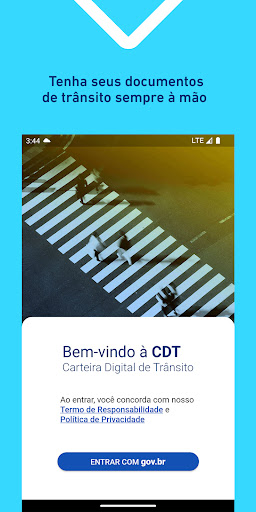
Carteira Digital de Trânsito
A Carteira Digital de Trânsito (CDT) é a evolução da CNH Digital. Agora, além da Carteira Nacional de Habilitação - CNH, também é possível baixar a versão digital do Certificado de Registro e Licenciamento de Veículo – CRLV (Documento do Veículo).
ATENÇÃO:
- Para utilizar o CRLV Digital, antes de baixar o aplicativo verifique se o seu Estado está habilitado a emitir o CRLV Digital;
- Para utilizar a CNH Digital, verifique se sua CNH impressa já possui QR Code no verso (CNHs emitidas a partir de 01/05/2017).
A CNH Digital e o CRLV Digital são as versões digitais da Carteira Nacional de Habilitação e do Certificado de Registro e Licenciamento de Veículo com o mesmo valor jurídico das respectivas versões impressas.
As versões digitais trazem vantagens adicionais que propiciam maior mobilidade, praticidade e comodidade por meio de:
- Fácil compartilhamento das informações (exportação para PDF com assinatura digital (.P7S) no padrão da ICP-Brasil com validade legal conforme MP 2.200-2/2001). Isto evita a impressão e/ou digitalização de documentos, bem como dispensa a autenticação cartorial;
- Pode ter sua autenticidade, confiabilidade e integridade validada facilmente através do aplicativo Vio. Para isso, basta baixar o app Vio e apontar o leitor para o QR Code do seu documento digital.
Para mais detalhes acesse:
Perguntas frequentes:
https://portalservicos.denatran.serpro.gov.br/#/faq/carteiradigital
Tutorial:
https://portalservicos.denatran.serpro.gov.br/carteiradigital/tutoriais/html/index.html
Facebook
Where real people propel your curiosity. Whether you’re thrifting gear, showing reels to that group who gets it, or sharing laughs over fun images reimagined by AI, Facebook helps you make things happen like no other social network.
Explore and expand your interests:
* Shop Marketplace for hidden gems and take your hobbies to the next level
* Personalize your Feed to see more of what you like, less of what you don’t
* Ask Meta AI for information and get answers instantly
* Drive into reels that reflect the things you're interested in
* Search Facebook on any topic and get more interactive results
Connect with people and communities:
* Join groups to learn tips from real people who’ve been there, done that
* Get inspired by creators, or catch up with Friends
* Add new Friends to your world, but also decide how closely to keep up with them
* Privately message relatable posts that only your BFF will get or that reels trend everyone’s talking about
* Catch up with your friends through video and voice calls
Share your world:
* Use generative AI to create custom stickers and images to delight friends
* Customize your profile to choose how you show up and who sees your posts
* Effortlessly create reels from trending templates, or showcase your creativity with a full suite of editing tools
* Capture moments on the fly with stories
Some features may not be available in your country or region.
Terms & Policies: https://www.facebook.com/policies_center
Privacy Policy: https://www.facebook.com/privacy
Learn how we're working to help keep our communities safe across Meta technologies at the Meta Safety Center: https://about.meta.com/actions/safety
Instagram
Little moments lead to big friendships. Share yours on Instagram.
—From Meta
Connect with friends, find other fans, and see what people around you are up to and into. Explore your interests and post what's going on, from your daily moments to life's highlights.
Share what you’re up to and into on Insta®.
- Keep up with friends on the fly with Stories and Notes that disappear after 24 hours.
- Start group chats and share unfiltered moments with your Close Friends.
- Share memories from recent events or trips in Feed.
- Turn your life into a movie and discover short, entertaining videos on Instagram with Reels.
- Customize your posts with exclusive templates, music, stickers and filters.
Dive into your interests.
- Watch videos from your favorite Creators and discover new content that’s personalized to your interests.
- Get inspired by photos and videos from new accounts in Explore.
- Discover brands and small businesses, and shop products that are relevant to your personal style.
Some Instagram features may not be available in your country or region.
Terms and Policies - https://help.instagram.com/581066165581870
Consumer Health Privacy Policy: https://privacycenter.instagram.com/policies/health
Learn how we're working to help keep our communities safe across Meta technologies at the Instagram Safety Center: https://about.instagram.com/safety

